Prerequisites
- Contract with FINA to obtain their services – more details on their website.
- Your company must have OIB number assigned. More info here.
- EBAexchange licence – required to exchange documents in EBA DMS.
- finaexchangeplugin – exchange plugin you install into EBA DMS.
Plugin developer
EBA d.o.o., Ljubljana
https://ebadms.com
1. Plugin settings
- Install plugin in EBA DMS
Install latest version of zziexchangeplugin into EBA DMS. See this article on how to install plugin. - Activate and setup plugin
Upon installing plugin you must activate it in EBA DMS.
After activation you can set mandatory data for exchange. Head to Administration>Exchange>Protocols menu and select FINA E-invoice from exchange list:
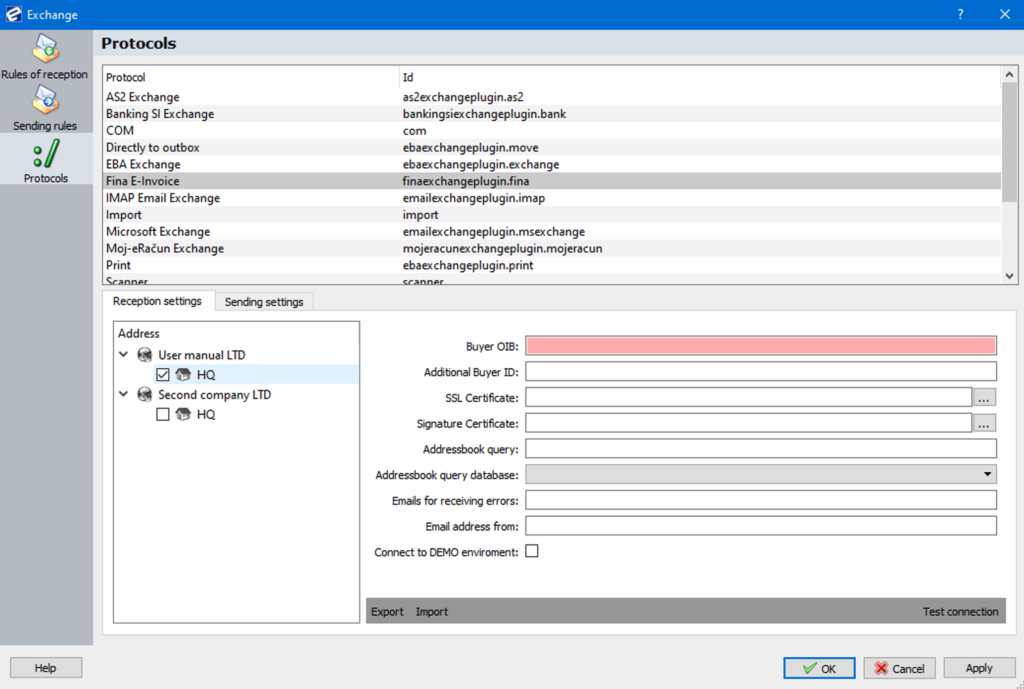
2. Mandatory settings
Reception/Sending settings – enter data in corresponding tabs. If you wish both sending and receiving fill settings in both tabs.
Fields highlighted in red means they are mandatory and you must fill them before exiting this menu.
Enable sending / receiving:
Tick a box before your Organization unit to enable protocol upon triggering send/receive function in EBA DMS:

You can set protocol for each company separately if you have multi-company setup.
Reception Settings
BuyerOIB: enter receiving company’s OIB number.
Sending Settings
Reception Settings
SupplierOIB: enter sending company’s OIB number.
3. Reception and Sending Rules
Reception rules:
You must define reception/sending rules in order to receive or send documents via FINA protocol.
See this article on general information about rules of reception and sending rules.
How to create receiving rule:
- Select FINA protocol from protocols list
- Choose partner (sender) and owner (if you have multi-company EBA DMS).
- Enter OIB number – sender’s OIB number
- Sender ID is optional – check with sender if data is needed.
How to create sending rule:
- Select FINA protocol from protocols list
- Choose partner (sender) and owner (if you have multi-company EBA DMS).
- Enter OIB – your company’s OIB number
- Additional Buyer ID – fill in if receiver has additional ID assigned
- Select if you want to send document image and/or attachment.