Prerequisites
- Register your company with UJP
- Register your company with EBA d.o.o. for UJP exchange
- ujpexchangeplugin – exchange plugin you install into EBA DMS.
Plugin developer
EBA d.o.o., Ljubljana
https://ebadms.com
1. Plugin settings
- Install plugin in EBA DMS
Install latest version of ujppexchangeplugin into EBA DMS. See this article on how to install plugin. - Activate and setup plugin
Upon installing plugin you must activate it in EBA DMS.
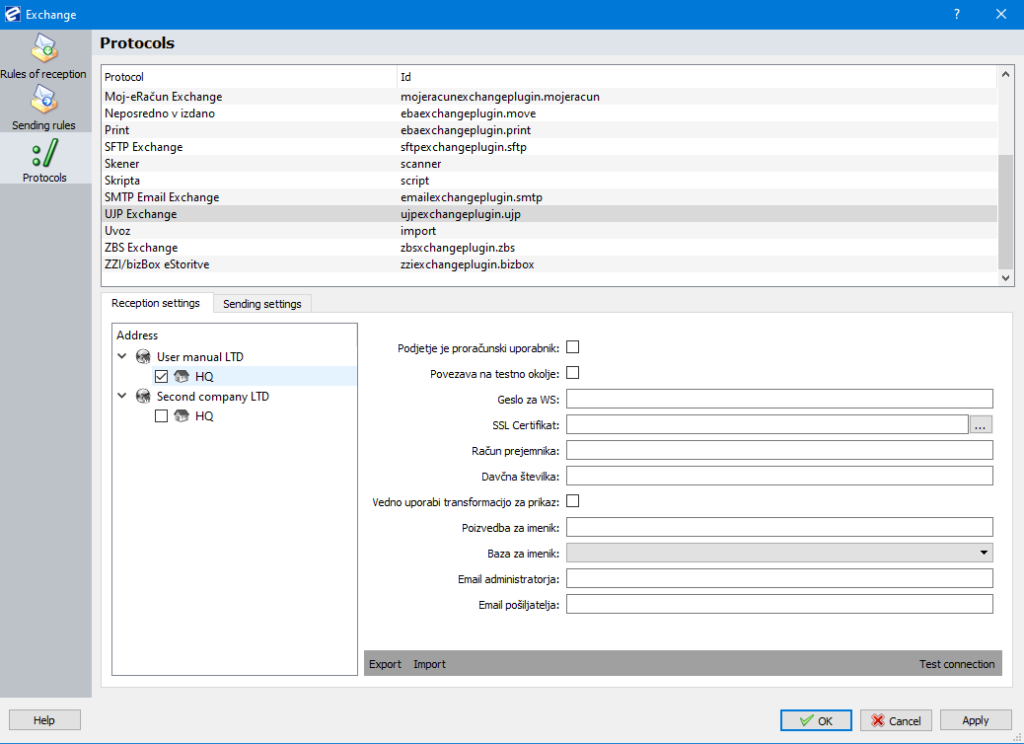
After activation you can set mandatory data for exchange. Head to Administration>Exchange>Protocols menu and select UJP from exchange list:
2. Settings
Reception settings/Sending settings – enter data in corresponding tabs to send or receive documents.
Enable sending / receiving:
Tick a box before your Organization unit to enable protocol upon triggering send/receive function in EBA DMS:

You can set protocol for each company separately if you have multi-company setup.
Reception Settings
Server address: enter SFTP server address.
Server path: path where to store files
Server port: port of SFTP server
Username, password: authentication to SFTP server
3. Sending Rules
Reception rules:
You must definesending rules in order to send documents via SFTP< protocol.
See this article on general information about rules of reception and sending rules.
How to create sending rule:
- Select SFTP protocol from protocols list
- Choose partner (sender) and owner (if you have multi-company EBA DMS).
- Enter server address